5 min read
UI Components
The @vecto-ui/ui package provides a set of ready-to-use, production-quality components built on top of @vecto-ui/core. Every component renders entirely on canvas; accessibility comes from the automatic A11y shadow DOM layer.
All Components Extend UIComponent
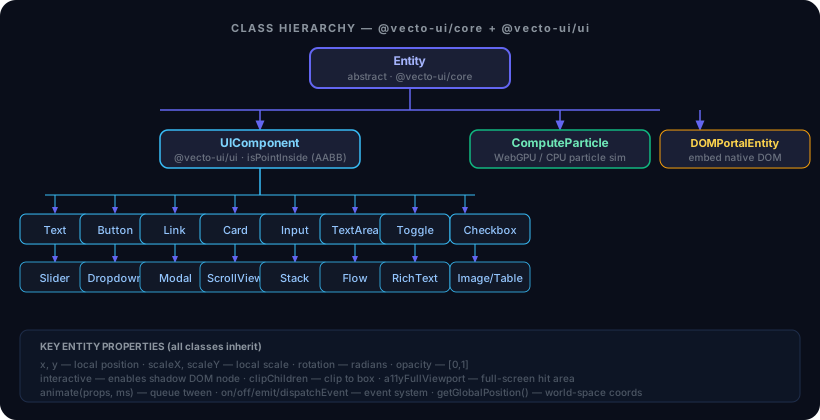
UIComponent extends Entity and adds a shared box model with AABB hit-testing. All inherited props (x, y, width, height, opacity, interactive, animate, on/off) work on every component.
Note on
interactive: Most form components (Button,Input,Text, etc.) setthis.interactive = truein their constructors.Cardis decorative by default — it becomes interactive only when you pass alabeloption.
Layout Containers
Stack
A flexbox-like container — positions children sequentially along a main axis:
import { Stack } from '@vecto-ui/ui';
import { Button, Text } from '@vecto-ui/ui';

const col = new Stack({ direction: 'vertical', gap: 12 });
col.add(new Text('Hello'));
col.add(new Button('Click me'));
scene.add(col.setPosition(40, 40));
Supports direction, gap, align (cross-axis), and optional wrap with maxWidth/maxHeight.
Flow
A Stack pre-wired as { direction: 'horizontal', wrap: true } — for chip rows and tag clouds:
import { Flow } from '@vecto-ui/ui';

const tags = new Flow({ gap: 8, maxWidth: 400 });
for (const label of ['TypeScript', 'WebGPU', 'Canvas']) {
  tags.add(new Button(label, { bg: '#1e293b', padding: 6 }));
}
scene.add(tags.setPosition(20, 20));
Card
A rounded background panel — add children on top:
import { Card } from '@vecto-ui/ui';

const card = new Card({
  width: 300,
  height: 200,
  bg: 'rgba(15, 23, 42, 0.8)',
  border: 'rgba(255, 255, 255, 0.1)',
  radius: 16,
  label: 'Settings panel', // makes it interactive + role="group"
});
card.add(toggle.setPosition(24, 24));
scene.add(card.setPosition(100, 100));
Form Controls
All form controls project a real, transparent shadow DOM node. Agents and screen readers interact through those native elements; the canvas renders the visuals.
Button
import { Button } from '@vecto-ui/ui';

const btn = new Button('Save', {
  bg: '#2563eb',
  hoverBg: '#3b82f6',
  onClick: () => save(),
});
scene.add(btn.setPosition(20, 20));
Auto-sizes to label. Projects <button> → getByRole('button', { name: 'Save' }).
Input (single-line)
import { Input } from '@vecto-ui/ui';

const input = new Input({
  width: 300,
  placeholder: 'Search…',
  onChange: (value) => console.log(value),
});
scene.add(input.setPosition(20, 80));
Backed by a real transparent <input> — the browser handles all typing, IME, clipboard, and undo natively. The canvas only draws the visual. IME composition underlines, caret blink, and RTL selection are all rendered.
TextArea (multi-line)
Same model as Input, backed by a <textarea>. Supports lineHeight, vertical scroll-to-caret, and lineOfOffset(offset) for caret-to-line mapping.
Toggle
import { Toggle } from '@vecto-ui/ui';

const toggle = new Toggle({
  label: 'Dark mode',
  checked: false,
  accent: '#6366f1',
  onChange: (checked) => applyTheme(checked),
});
Projects role="switch" with aria-checked. Both canvas clicks and keyboard activation (Enter/Space on the shadow div) route through the same onChange callback.
Checkbox
import { Checkbox } from '@vecto-ui/ui';

const cb = new Checkbox({
  label: 'Subscribe to updates',
  checked: true,
  accent: '#2563eb',
  onChange: (checked) => setSubscribed(checked),
});
Backed by <input type="checkbox"> — natively toggleable by keyboard and assistive tech.
Slider
import { Slider } from '@vecto-ui/ui';

const slider = new Slider({ min: 0, max: 100, value: 50, width: 200 });
slider.on('change', (e) => console.log(e.value));
Draggable thumb; value rounded to nearest integer. Projects role="slider".
Dropdown
import { Dropdown } from '@vecto-ui/ui';

const dd = new Dropdown(['Small', 'Medium', 'Large'], { value: 'Medium' });
dd.on('change', (e) => setSize(e.value));
scene.add(dd.setPosition(20, 160));
Opens a floating overlay menu via scene.showOverlay(); closes on selection or Escape. Full ARIA combobox/listbox wiring.
Text & Typography
Text
Wrapping multi-line text with a cold/hot layout split:
import { Text } from '@vecto-ui/ui';

const label = new Text('Hello, VectoUI!', {
  font: '600 18px "Outfit", sans-serif',
  color: '#e2e8f0',
  maxWidth: 400,
  lineHeight: 28,
});setText(text)— re-measures (cold pass).append(text)— streaming path; only re-measures the changed last paragraph.setMaxWidth(w)— reflow only, no re-measure (hot pass).
RichText
Multi-style inline text with bold/italic/color/size runs, link hotspots, and exclusion shapes:
import { RichText } from '@vecto-ui/ui';

const rich = new RichText(
  [
    { text: 'Zero DOM, ' },
    { text: 'accessible', style: { bold: true, color: '#38bdf8' } },
    { text: ' and agent-native.' },
  ],
  { maxWidth: 500 },
);
For streaming: use appendSpans(newSpans) — O(changed paragraph).
Overlays
Modal
import { Modal } from '@vecto-ui/ui';

const modal = new Modal('Confirm Delete', {
  modalWidth: 420,
  modalHeight: 200,
});
scene.showOverlay(modal);

// From within: modal.close() animates and self-removes.
Spring-animated scale-in. Includes a built-in Close button.
ScrollView
A clipped viewport with spring-physics scroll:
import { ScrollView } from '@vecto-ui/ui';

const feed = new ScrollView({ width: 360, height: 600 });
for (const item of items) feed.add(new Card({ ... }));
scene.add(feed.setPosition(20, 20));
feed.scrollToBottom();  // e.g. for a chat log
Wheel, touch-drag, and programmatic scrollTo(y) all supported.
Rich Content
Markdown
Renders a Markdown string into a VMT subtree — headings, paragraphs, code blocks with syntax highlighting, tables, blockquotes, links, and inline formatting:
import { Markdown } from '@vecto-ui/ui';

const doc = new Markdown('## Hello\n\nThis is **bold** and `code`.', {
  maxWidth: 700,
});
scene.add(doc.setPosition(40, 40));
For LLM streaming, use appendMarkdown(chunk) — it diffs the token stream and only rebuilds the last changed paragraph, keeping cost O(changed paragraph) not O(document).
const md = new Markdown('', { maxWidth: 600 });
scene.add(md);
for await (const token of llmStream) {
  md.appendMarkdown(token);
}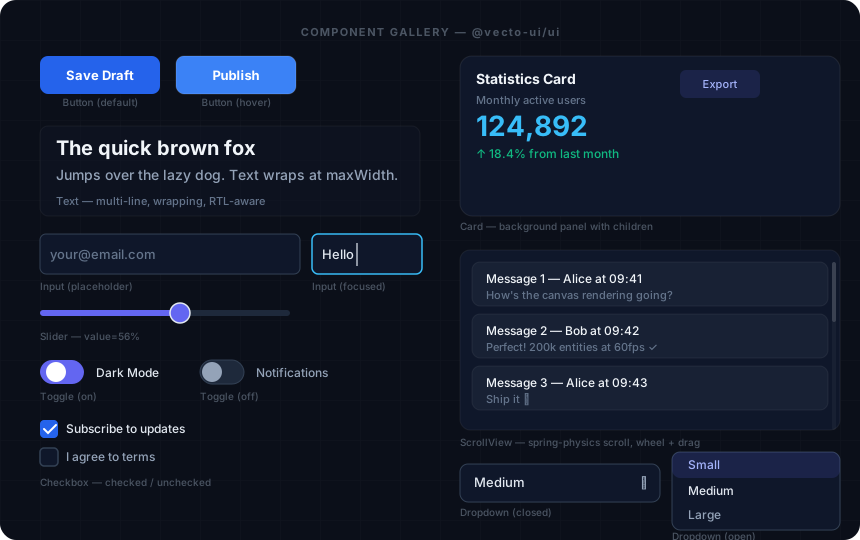
See the UI Components Reference for complete option signatures.