12 min read
Building Custom Entities
Every object in VectoUI is an Entity — a node in the Virtual Math Tree. Built-in components like Button and Toggle are just Entity subclasses you can use as-is. This guide shows you how to build your own.
Try it live
GaugeWidget custom entities with animated arc fills. Click Randomize to see the animate() tween system in action.The local coordinate system
This is the most important thing to internalize before writing your first render() method:
Your entity draws at
(0, 0). The canvas is already transformed to your entity’s position, scale, and rotation beforerender()is called.
The Scene applies transforms in T · S · R order (Translate → Scale → Rotate) as it walks down the tree. By the time your render(renderer) is invoked, the origin is your entity’s top-left corner, your scale is in effect, and your rotation is applied. You never need to read this.x or this.y inside render().
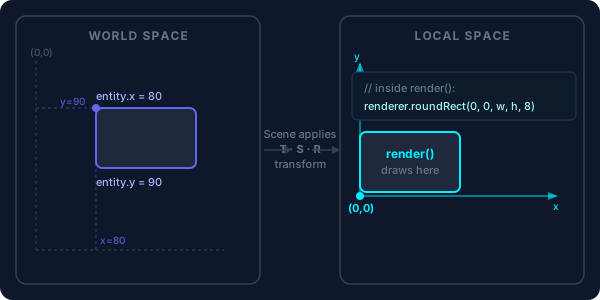
render(). You always draw at (0, 0).import { Entity } from '@vecto-ui/core';
import type { IRenderer } from '@vecto-ui/core/renderer';
class Banner extends Entity {
color = '#6366f1';
isPointInside(_gx: number, _gy: number) {
return false;
}
render(renderer: IRenderer) {
// Draw relative to (0, 0) — not (this.x, this.y)
renderer.beginPath();
renderer.roundRect(0, 0, this.width, this.height, 12);
renderer.fill(this.color);
}
}
const banner = new Banner();
banner.width = 300;
banner.height = 60;
banner.setPosition(80, 120); // controls where it appears on screen
scene.add(banner);Minimal implementation contract
Two methods are required:
abstract class Entity {
  // Return true if the global pointer coordinates (gx, gy) hit this entity.
  abstract isPointInside(gx: number, gy: number): boolean;

  // Draw the entity. The renderer is already in local space — origin is (0,0).
  abstract render(renderer: IRenderer): void;
}
If your entity has no interactive area, return false from isPointInside. If you want hit-testing, use getGlobalPosition() to convert:
isPointInside(gx: number, gy: number): boolean {
  const pos = this.getGlobalPosition();
  return gx >= pos.x && gx <= pos.x + this.width
      && gy >= pos.y && gy <= pos.y + this.height;
}
> UIComponent already implements this AABB test for you. Extend UIComponent from @vecto-ui/ui instead of Entity directly when your component has a rectangular hitbox — you get isPointInside, getBounds, and padding for free.
The IRenderer API
The renderer object passed to render() provides a Canvas2D-like drawing surface (but backend-agnostic — it might be Canvas2D, WebGL, or SVG).
// Paths
renderer.beginPath()
renderer.moveTo(x, y)
renderer.lineTo(x, y)
renderer.bezierCurveTo(cp1x, cp1y, cp2x, cp2y, x, y)
renderer.arc(cx, cy, radius, startAngle, endAngle, counterclockwise?)
renderer.roundRect(x, y, w, h, radii)
renderer.closePath()

// Fills and strokes
renderer.fill(colorOrGradient)       // e.g. '#ff0' or a gradient descriptor
renderer.stroke(colorOrGradient, lineWidth?)

// Text (native browser canvas text — no LayoutEngine)
renderer.fillText(text, x, y, font, color)  // font = CSS shorthand

// Images
renderer.drawImage(source, dx, dy, dw, dh)

// Fast circle batch (coalesces same-color runs)
renderer.fillCircle(cx, cy, radius, color, alpha?)

// State
renderer.save()
renderer.restore()
renderer.translate(x, y)
renderer.scale(x, y)
renderer.rotate(angle)        // radians
renderer.setGlobalAlpha(a)
renderer.clip(x, y, w, h)    // inside save/restore

// Gradients
renderer.createLinearGradient(x0, y0, x1, y1, colorStops)
Example — gradient card:
render(renderer: IRenderer) {
  const gradient = renderer.createLinearGradient(0, 0, this.width, 0, [
    { stop: 0, color: '#6366f1' },
    { stop: 1, color: '#38bdf8' },
  ]);
  renderer.beginPath();
  renderer.roundRect(0, 0, this.width, this.height, 16);
  renderer.fill(gradient);

  renderer.fillText('Hello canvas', 20, this.height / 2 - 8, '600 18px Inter', '#fff');
}
Viewport culling with getBounds()
By default, entities are never culled — even offscreen entities run update() and render(). Override getBounds() to return a local-space bounding box and the Scene will skip rendering when the entity is outside the viewport:
getBounds() {
  return { x: 0, y: 0, width: this.width, height: this.height };
}
UIComponent already does this. Raw Entity subclasses should implement it for large scenes.
Per-frame logic with update(dt, time)
Override update() to run code every frame. Call super.update(dt, time) first to advance queued animate() tweens.
> dt is in milliseconds, not seconds. At 60 fps, dt ≈ 16.7. Divide by 1000 to get seconds.
class Spinner extends Entity {
  speed = 1.5; // rad/s

  update(dt: number, time: number) {
    super.update(dt, time);
    this.rotation += this.speed * (dt / 1000); // dt/1000 → seconds
    this.scene?.markDirty();
  }

  isPointInside() {
    return false;
  }

  render(renderer: IRenderer) {
    renderer.beginPath();
    renderer.arc(this.width / 2, this.height / 2, 30, 0, Math.PI * 2);
    renderer.stroke('#00f0ff', 3);
  }
}
time is performance.now() and is useful for oscillations that must not drift:
this.y = Math.sin(time * 0.002) * 20; // stable float, not accumulated errorSmooth animation with animate()
For one-shot transitions, animate() is often better than a custom update():
entity
  .animate({ x: 300, opacity: 0 }, 400) // ease-out, 400 ms
  .animate({ opacity: 1 }, 200); // chained: starts when the first finishes
Only numeric properties interpolate. Easing is ease-out quadratic (t * (2 - t)). A running tween keeps the scene non-static and calls markDirty() automatically.
Making an entity interactive
Set interactive = true and implement isPointInside. Then attach listeners with on():
class Chip extends Entity {
  selected = false;
  label: string;

  constructor(label: string) {
    super();
    this.label = label;
    this.interactive = true;
    this.width = 80;
    this.height = 32;

    this.on('click', () => {
      this.selected = !this.selected;
      this.animate({ scaleX: 0.92, scaleY: 0.92 }, 80).animate({ scaleX: 1, scaleY: 1 }, 80);
      this.scene?.markDirty();
    });
  }

  isPointInside(gx: number, gy: number): boolean {
    const p = this.getGlobalPosition();
    return gx >= p.x && gx <= p.x + this.width && gy >= p.y && gy <= p.y + this.height;
  }

  render(renderer: IRenderer) {
    renderer.beginPath();
    renderer.roundRect(0, 0, this.width, this.height, 16);
    renderer.fill(this.selected ? '#6366f1' : 'rgba(99,102,241,0.2)');
    renderer.fillText(this.label, 12, 9, '500 14px Inter', '#fff');
  }
}
A11y projection with getA11yAttributes()
When your entity is interactive, VectoUI projects a transparent real DOM node over it. By default this is a plain <div> — not very useful for assistive technology. Override getA11yAttributes() to tell the framework what node to project:
import type { A11yAttributes } from '@vecto-ui/core';

class Chip extends Entity {
  getA11yAttributes(): A11yAttributes {
    return {
      tag: 'button',
      role: 'button',
      label: this.label,
    };
  }
}
Now Playwright’s page.getByRole('button', { name: 'OK' }) finds your chip, screen readers announce it, and keyboard users can Tab to and Enter it. The full set of fields:
interface A11yAttributes {
  tag?: 'div' | 'a' | 'button' | 'img' | 'input' | 'textarea'; // default 'div'
  role?: string;
  label?: string; // aria-label
  href?: string; // for tag='a'
  src?: string;
  alt?: string; // for tag='img'
  inputType?: string; // 'text', 'checkbox', etc.
  placeholder?: string;
  value?: string;
  checked?: boolean;
  disabled?: boolean;
  expanded?: boolean;
  controls?: string;
  haspopup?: string;
  selected?: boolean;
  activedescendant?: string;
  valuemin?: string;
  valuemax?: string;
}
WebGL batching with getBatchCircle() and getBatchRect()
For particle-like entities (dots, points) running in the thousands, the per-entity save/translate/render/restore path is too slow. Use the batch fast-path instead:
class Particle extends Entity {
  radius = 4;
  color = '#00f0ff';

  // Skip the individual render path entirely — feed the WebGL batch directly.
  getBatchCircle() {
    return { radius: this.radius, color: this.color };
  }

  isPointInside() {
    return false;
  }
  render() {} // never called when getBatchCircle is set
}
Constraints:
- The entity must be a leaf (no children).
- The entity’s scale must be uniform (
scaleX === scaleY). - Requires
pointBackend: 'webgl'on theScene.
The Scene reads getBatchCircle() every frame, so animated radius/color are honored. Consecutive same-color siblings coalesce into one GPU draw call. For rectangles, use getBatchRect() instead:
getBatchRect() {
  return { width: this.width, height: this.height, color: this.color };
}
Full example: animated gauge widget
import { Entity } from '@vecto-ui/core';
import type { IRenderer } from '@vecto-ui/core/renderer';
import type { A11yAttributes } from '@vecto-ui/core';

class GaugeWidget extends Entity {
  private _value = 0;
  private _displayValue = 0; // interpolated

  label: string;
  min: number;
  max: number;
  accentColor: string;

  constructor(label: string, opts: { min?: number; max?: number; accent?: string } = {}) {
    super();
    this.label = label;
    this.min = opts.min ?? 0;
    this.max = opts.max ?? 100;
    this.accentColor = opts.accent ?? '#00f0ff';
    this.width = 180;
    this.height = 180;
    this.interactive = true;
  }

  get value() {
    return this._value;
  }

  setValue(v: number) {
    this._value = Math.max(this.min, Math.min(this.max, v));
    // Smooth visual transition
    this.animate({ _displayValue: this._value } as any, 600);
  }

  update(dt: number, time: number) {
    super.update(dt, time);
  }

  getBounds() {
    return { x: 0, y: 0, width: this.width, height: this.height };
  }

  isPointInside(gx: number, gy: number): boolean {
    const p = this.getGlobalPosition();
    return gx >= p.x && gx <= p.x + this.width && gy >= p.y && gy <= p.y + this.height;
  }

  getA11yAttributes(): A11yAttributes {
    return {
      role: 'meter',
      label: this.label,
      value: String(this._value),
      valuemin: String(this.min),
      valuemax: String(this.max),
    };
  }

  render(renderer: IRenderer) {
    const cx = this.width / 2;
    const cy = this.height / 2;
    const r = 70;
    const startAngle = Math.PI * 0.75;
    const endAngle = Math.PI * 2.25;
    const progress = (this._displayValue - this.min) / (this.max - this.min);
    const sweepAngle = startAngle + (endAngle - startAngle) * progress;

    // Track
    renderer.beginPath();
    renderer.arc(cx, cy, r, startAngle, endAngle);
    renderer.stroke('rgba(255,255,255,0.12)', 10);

    // Progress arc
    if (progress > 0) {
      renderer.beginPath();
      renderer.arc(cx, cy, r, startAngle, sweepAngle);
      renderer.stroke(this.accentColor, 10);
    }

    // Value label
    renderer.fillText(
      `${Math.round(this._displayValue)}`,
      cx - 20,
      cy - 14,
      'bold 36px Inter',
      '#f8fafc',
    );
    renderer.fillText(this.label, cx - 30, cy + 20, '14px Inter', '#94a3b8');
  }
}

// Usage:
const gauge = new GaugeWidget('CPU', { accent: '#6366f1' });
gauge.setPosition(60, 60);
scene.add(gauge);
gauge.setValue(72);
Summary
| Method | When to override |
|---|---|
render(renderer) |
Always — draws the entity in local space at (0,0) |
isPointInside(gx, gy) |
Always — return false for decorative entities |
update(dt, time) |
Per-frame logic; call super.update first; dt in ms |
getBounds() |
For viewport culling (strong recommendation) |
getA11yAttributes() |
When interactive — controls the shadow DOM node |
getBatchCircle() / getBatchRect() |
Particle-like leaf entities in the thousands |
Troubleshooting
Entity is added but nothing appears on screen
Check in order:
scene.start()not called — the render loop never fires without it.render()doesn’t call any draw methods — an emptyrender()is silent. Verifyrenderer.fill()orrenderer.stroke()is reached.widthorheightis0— the entity may be offscreen or culled. Setentity.width = 200; entity.height = 80and check if it appears.opacityis0— checkentity.opacity.- Entity not added to the scene —
new MyEntity()constructs but does not add. Callscene.add(entity).
isPointInside never returns true / click events don’t fire
isPointInside receives global (world-space) coordinates. If you test them against this.x / this.y directly without calling getGlobalPosition(), children of transformed parents will mis-hit:
// Wrong — only works when entity is at scene root with no parent transforms
isPointInside(gx, gy) {
  return gx >= this.x && gx <= this.x + this.width; // ← breaks in a nested tree
}

// Correct — always works
isPointInside(gx, gy) {
  const p = this.getGlobalPosition();
  return gx >= p.x && gx <= p.x + this.width
      && gy >= p.y && gy <= p.y + this.height;
}
Also make sure entity.interactive = true is set — without it, no pointer events are dispatched to the entity.
getBatchCircle() / getBatchRect() is not being used
Two requirements that are easy to miss:
- The Scene must have
pointBackend: 'webgl'set in its constructor options. - The entity must be a leaf (no
children). If youadd()a child to a batch entity, it silently falls back to the normalrender()path.
Check console.log(scene.getRenderer()) — if the renderer is CanvasRenderer and there’s no WebGL layer, pointBackend: 'webgl' was not set or WebGL2 is unavailable.
Shadow DOM node is missing in DevTools
The a11y shadow node is only created when both conditions are true:
entity.interactive === trueentity.width > 0(orentity.a11yFullViewport === true)
An entity with interactive = true but width = 0 gets no shadow node. Set entity.width and entity.height to match the visual size.
Challenges
Progress bar entity
Build a ProgressBar entity that shows an animated fill bar and is correctly announced by screen readers as a progress indicator.
- Properties:
min: number,max: number,value: number,barColor: string,trackColor: string, andwidth/height. - Implement
setValue(n: number)that clampsnto[min, max]and callsthis.animate({ displayValue: n }, 400)wheredisplayValuedrives the rendered fill width. - Override
getA11yAttributes()to return{ role: 'progressbar', valuemin, valuemax, value }as strings so assistive technology announces the current percentage.
Donut chart
Extend GaugeWidget (the full example at the bottom of this page) to render a donut shape with a visible gap between the track arc and the progress arc, and add a category legend label below the value.
- Reduce the track arc radius by 6 px and increase the progress arc radius by 6 px (or vice versa) to create a visible gap between the two concentric rings.
- Add a
legendLabel: stringproperty and render it below the numeric value in a smaller, muted color usingrenderer.fillText. - Update
getA11yAttributes()to appendlegendLabelto the returnedlabelfield so the full description is announced by screen readers.
Click counter chip
Extend the Chip entity from the interactive section of this page so that each click increments a counter and shows a small circular badge in the top-right corner displaying the count.
- Add a
clickCount = 0property and increment it inside the'click'handler alongside the existing toggle and scale animation. - In
render(), draw the badge (a small filled circle with the count as text inside) only whenclickCount > 0; position it at(this.width - 10, -6)in the chip’s local coordinate space. - Override
getA11yAttributes()to include the current count in thelabelfield, e.g.'OK — 3 clicks', so the accessible name stays current as the count changes.
Next: Events & Hit-Testing — how pointer events propagate through the entity tree with capture and bubble.