6 min read
Core Scene Architecture
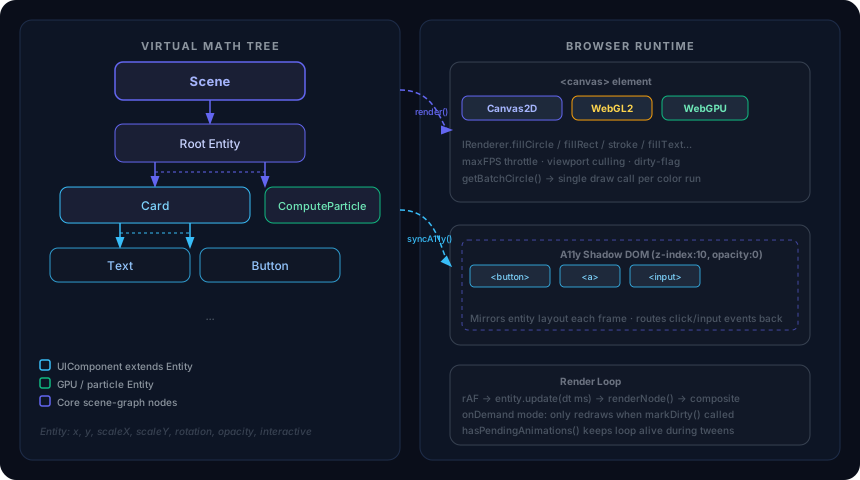
VectoUI discards the traditional browser DOM. Instead, it implements a Virtual Math Tree (VMT) inside @vecto-ui/core.
The Scene
The Scene class is the root orchestrator. It manages three critical pipelines:
- The Render Loop — A
requestAnimationFrameloop that sequentially runs physics/animations, then renders via anIRenderer. - Hit-Testing — Pure mathematical O(N) raycasting to detect pointer hover and clicks without
document.elementFromPoint. - Accessibility Proxy — Bidirectional syncing of focus, layout, and values to an invisible A11y shadow DOM above the canvas.
Initialization
import { Scene } from '@vecto-ui/core';

const canvas = document.querySelector<HTMLCanvasElement>('#canvas')!;
const scene = new Scene(canvas, {
  pointBackend: 'webgl', // Use WebGL2 for batch circles/rects (10-100× faster)
  maxFPS: 60,
});
scene.start();
The Scene inserts two transparent <div>s into the canvas’s parent element: one for the A11y shadow layer (z-index: 10) and one for the DOM portal layer (z-index: 9). The parent is forced to position: relative on every frame if it was static.
Render Modes
| Mode | Behavior | Use when |
|---|---|---|
'always' (default) |
Re-render every frame, capped by maxFPS. |
Continuous animation, particle sims. |
'onDemand' |
Only render when dirty or a tween is pending. Idle cost ≈ 0. | Static/event-driven UIs. |
scene.renderMode = 'onDemand';
// Then call scene.markDirty() from event handlers to request a repaint.
The idle auto-throttle gotcha. In 'always' mode, a scene with no pending tweens and no dirty flag is throttled to ~2 fps to save battery. If you hand-animate by mutating entity.x in a custom update(), call scene.markDirty() between frames (from an event handler or separate rAF) — not inside update() itself, because the post-render reset wipes the flag before the next check.
The Entity System
Every object in VectoUI extends the abstract Entity class.
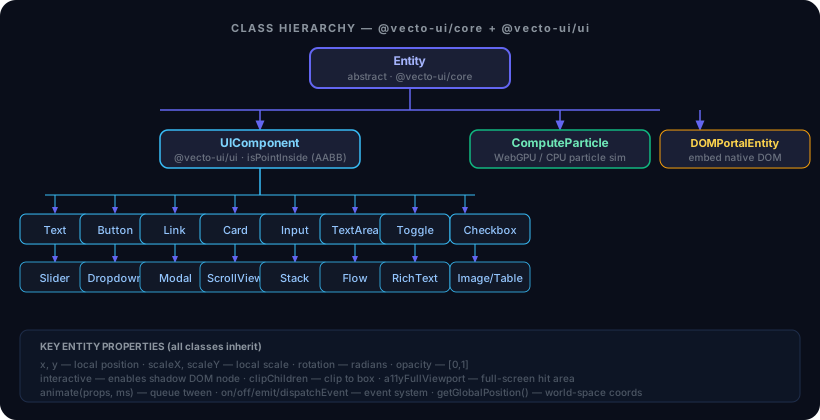
An Entity owns:
- A position (
x,y), scale (scaleX,scaleY), rotation (radians), and opacity. - A children array — the VMT is a tree.
- A hit box (
width,height) used by UIComponent’s AABB hit-test. - Optional flags:
interactive,clipChildren,a11yFullViewport.
Full property reference
| Property | Type | Default | Notes |
|---|---|---|---|
x, y |
number |
0 |
Local position |
scaleX, scaleY |
number |
1 |
Local scale |
rotation |
number |
0 |
Radians |
opacity |
number |
1 |
[0,1] |
width, height |
number |
0 |
Hit box size |
interactive |
boolean |
false |
Enables shadow DOM node + events |
clipChildren |
boolean |
false |
Clip children to [0,0]–[width,height] (Canvas2D only) |
a11yFullViewport |
boolean |
false |
Creates a viewport-filling shadow node (for boundless surfaces) |
a11yOffsetX/Y |
number |
0 |
Fine-tune shadow node placement |
Subclassing Entity
import { Entity } from '@vecto-ui/core';
import type { IRenderer } from '@vecto-ui/core/renderer';

class GlowRect extends Entity {
  color = '#6366f1';

  isPointInside(gx: number, gy: number): boolean {
    // gx/gy are in global (world) coordinates.
    const local = this.getGlobalPosition();
    return (
      gx >= local.x && gx <= local.x + this.width && gy >= local.y && gy <= local.y + this.height
    );
  }

  render(renderer: IRenderer): void {
    renderer.beginPath();
    renderer.roundRect(0, 0, this.width, this.height, 8);
    renderer.fill(this.color);
  }
}

const rect = new GlowRect();
rect.width = 200;
rect.height = 80;
rect.setPosition(100, 100);
scene.add(rect);
Note:
render()is called with the renderer already translated to the entity’s global position, scaled, and rotated. Draw from(0, 0).
Hit-Testing and Events
Set entity.interactive = true to receive pointer events. The Scene calls entity.isPointInside(x, y) every frame — the first entity (depth-first, front to back) whose method returns true is the hit target. There is no interactive filter during traversal: if a non-interactive entity implements isPointInside, it can still be returned.
rect.interactive = true;

rect.on('click', (e) => {
  rect.animate({ color: '#38bdf8' }, 300);
});

rect.on('hover', (e) => {
  document.body.style.cursor = 'pointer';
});
rect.on('pointerleave', () => {
  document.body.style.cursor = 'default';
});
Available events: click, hover, pointerdown, pointerup, pointermove, pointerleave, change, focus, blur, wheel, keydown, keyup.
Events propagate DOM-style: capture (root → target) then bubble (target → root). Pass { capture: true } to listen on the capture phase. Use e.stopPropagation() to halt traversal, or e.stopImmediatePropagation() to also skip remaining listeners on the current node.
Animation
entity.animate() queues a smooth ease-out tween for any numeric property:
// Chain two tweens: slide right, then fade out.
rect.animate({ x: 400 }, 400).animate({ opacity: 0 }, 200);
The easing function is ease-out quadratic: t * (2 - t). A running tween keeps the scene alive (via hasPendingAnimations()) even in onDemand mode.
Custom update()
Override Entity.update(dt, time) to implement per-frame logic.
> dt is in milliseconds, not seconds. A common mistake is writing this.rotation += dt * 3 expecting 3 rad/s — that actually rotates at 3000 rad/s. Multiply by 0.001 (or divide velocities by 1000) to convert.
time is performance.now():
class Spinner extends Entity {
  update(dt: number, _time: number): void {
    super.update(dt, _time); // advances queued tweens
    this.rotation += dt * 0.003; // dt is ms, so this is 3 rad/s
    this.scene?.markDirty();
  }
}
The Rendering Pipeline
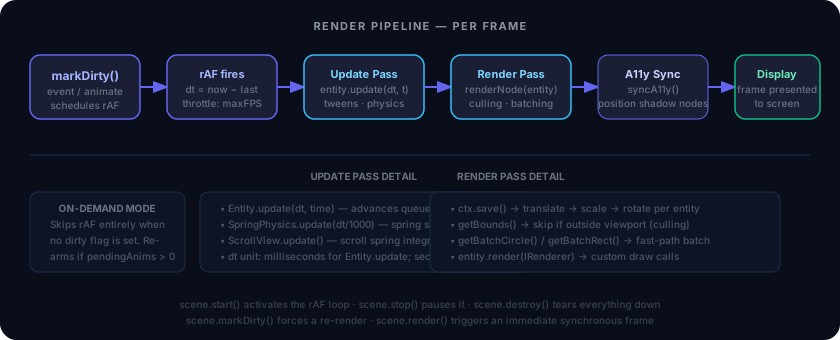
Each frame:
- Clear —
renderer.clear() - Update — Walk the tree calling
entity.update(dt, time)(dtin ms,timefromperformance.now()). - Cull — Skip entities where
getBounds()is outside the viewport. - Render — Translate/scale/rotate the renderer to each entity’s global transform, then call
entity.render(renderer). - Flush — Commit any pending batch draws (circles, WebGL points).
- Sync A11y — Update the shadow DOM (throttled by
a11ySyncInterval).
Because everything happens in JS memory and dumps directly to Canvas, there is zero browser layout thrashing. DOM node count stays flat while animating thousands of entities.
Performance Hints
Batch drawing
Override getBatchCircle() or getBatchRect() to opt a leaf entity into the WebGL point layer (requires pointBackend: 'webgl'):
getBatchCircle() {
  return { radius: this.radius, color: this.color };
}
Batched leaves skip the full save/translate/render/restore path; consecutive same-color siblings coalesce into a single GPU draw call.
Viewport culling
Override getBounds() to return an AABB. Entities outside the viewport skip rendering entirely:
getBounds() {
  return { x: 0, y: 0, width: this.width, height: this.height };
}
UIComponent already implements getBounds() — custom raw Entity subclasses that have a fixed size should too.
On-demand rendering
Switch scene.renderMode = 'onDemand' for mostly-static UIs. Idle frames cost nothing. Call scene.markDirty() from event handlers.